Accounts
Creating an account
Sign up
If self-registration is enabled on your OpenHEXA instance, you can create an account directly from the sign-up page:
- Navigate to the Sign up page.
- Enter your email address.
- Click Sign up.
- Check your email inbox for a verification link.
- Click the link to complete your registration (the link expires after 48 hours).
If you already have an account, click Already have an account? Sign in to go to the login page.
Self-registration availability
Self-registration may not be available on all OpenHEXA instances. If you see a message indicating that self-registration is disabled, contact your administrator to request an invitation.
Accept an invitation
If you received an invitation to join a workspace, click the link in the invitation email to create your account and access the workspace.
Managing your account
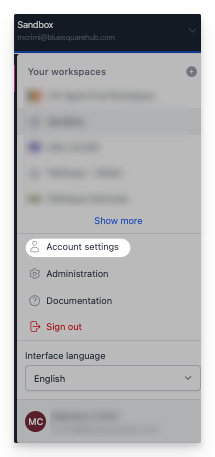
You can manage your personal information and security settings on the Account page in OpenHEXA.
Personal information
Update your profile
You can view and modify your account information in the Personal Details section:
- First Name: Your first name
- Last Name: Your last name
- Email: Your email address (read-only)
- Joined: When you created your account (read-only)
Save your changes
After you make changes to your personal information:
- Click Save to apply your changes.
- Click Cancel to discard any unsaved changes.
Security settings
Two-factor authentication (2FA)
Two-factor authentication adds extra security to your account. It requires a second form of verification in addition to your password.
Enable 2FA
- In the Security section, find Two-Factor Authentication.
- If it's currently disabled, click Enable.
- Follow the setup instructions to configure your preferred 2FA method.
- Complete the verification process.
Benefits of 2FA
- Protects your account even if your password is compromised
- Required for accessing sensitive features and data
- Helps maintain compliance with security policies
Best practices
- Keep your personal information up to date
- Enable two-factor authentication for enhanced security
- Use a strong, unique password for your OpenHEXA account
- Regularly review your security settings
- Choose your preferred language for the best user experience
Language settings
You can use OpenHEXA in multiple languages. Available languages include:
- 🇬🇧 English: Default language
- 🇫🇷 French: Interface en français
Change your language
To change the interface language:
- Find the language selector in the workspace switcher.
- Select your preferred language from the available options.
- The interface updates immediately to display in the selected language.